AI Tooling
Designers increasingly use AI coding tools to turn Figma files into working interfaces, but poorly structured files can produce unreliable output. I built and shipped MCP Ready, a Figma plugin that audits a selected frame for the structure, naming, and layout practices that support AI-assisted code generation. It gives designers a simple readiness score and targeted recommendations before they hand work to tools like Claude Code or Cursor.
Key Achievements:
Identified a gap in AI-assisted design handoff and shipped a working MVP in two weeks
Built and tested the plugin through direct use with Claude Code and Figma’s MCP server, aligning recommendations with real implementation workflows
Recorded 162 users, 246 Figma Community views, and 19 saves between launch and March 2026, indicating early community traction
Created a reusable foundation for future features across Figma and AI-assisted development workflows
Skills Used
Solution
Designed the plugin around three scannable sections that update automatically whenever the selection changes.
Used Figma best practices, Claude Code, and Markdown documentation to make the plugin’s recommendations clear and actionable.
Iterated on the interface and implementation together, refining the experience until the product was both understandable and usable.
Discovery
I used Figma’s MCP server to provide Claude Code with design context while iterating on the plugin over one month. The generated implementation handled most of the layout, while I refined icons, interactions, and small code details to bring the build closer to the source design.
I used the plugin during its own development to test whether its recommendations were practical in a real AI-assisted workflow.
Outcome
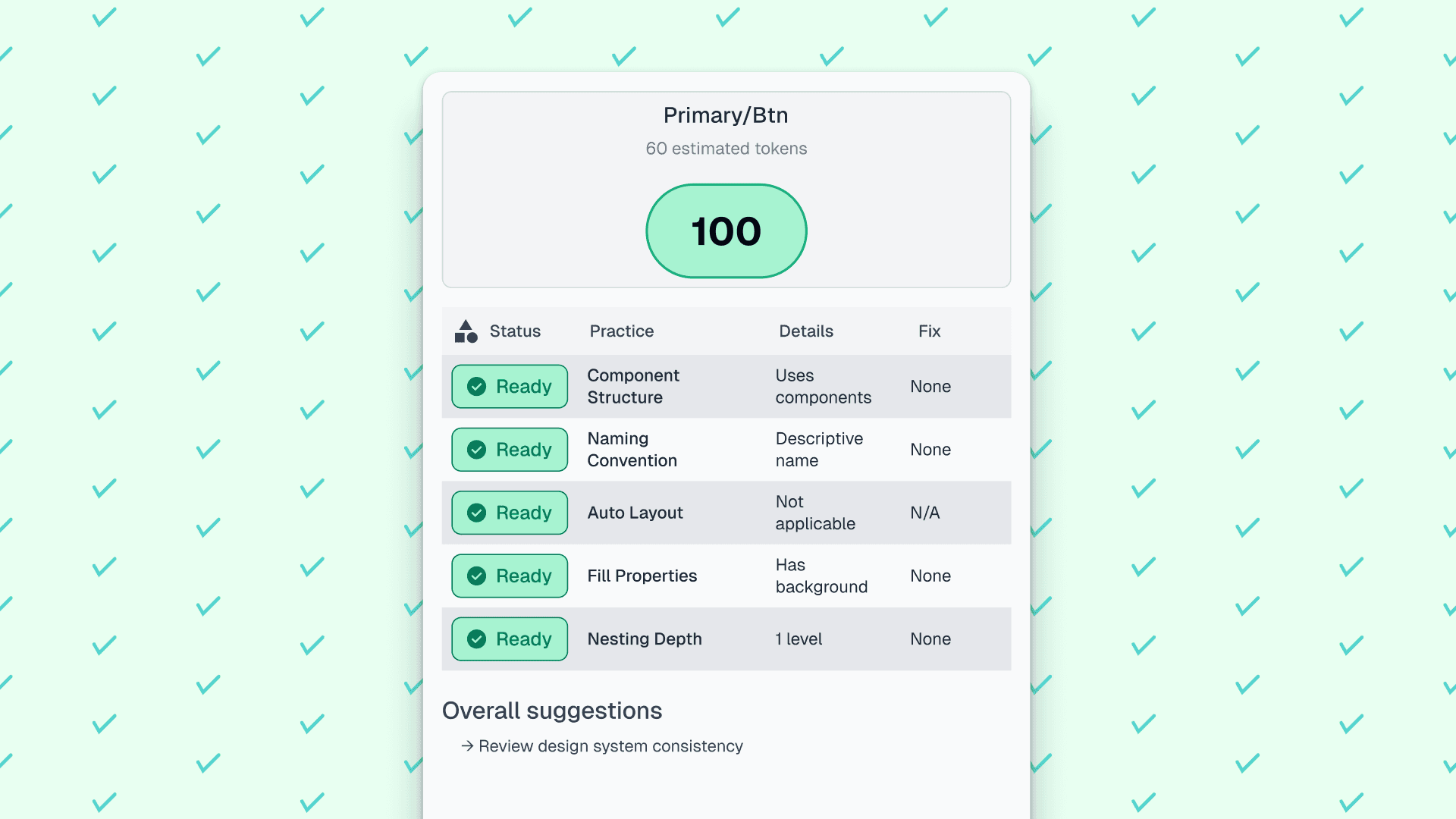
I designed and built MCP Ready in two weeks using Claude Code and iterative work in Figma. Using the MCP server, I shaped the plugin interface in code and refined it against the source design. The plugin evaluates a selected frame and returns a readiness score—Ready, Almost, or Rework—along with targeted recommendations.
It checks five areas: component structure, naming conventions, auto layout, fill properties, and nesting depth. Each check is tied to the quality of AI-generated code. I also added token-cost estimation so designers could gauge complexity before sending a selection to an AI code editor, building on the token estimate available in Figma Dev Mode. The plugin updates automatically when the selection changes, eliminating manual refreshes.
Between its launch on October 27, 2025, and March 2026, MCP Ready recorded 162 users, 246 Figma Community views, and 19 saves. These results indicated early community traction among designers and builders exploring AI-assisted workflows.
Impact (updated September 2026)
By September 2026, the plugin had reached 913 cumulative users. Adoption later plateaued as Generative Plugins changed how similar workflows were built inside Figma. The project still established a reusable foundation for future features and validated my ability to ship an end-to-end product with AI-assisted development. A future direction would be to extend the framework into a generative plugin or skill for AI-assisted IDEs such as Cursor and Claude Code.